Secure your edge from ego
Control your
trading
Or it controls you
Trading platform for traders
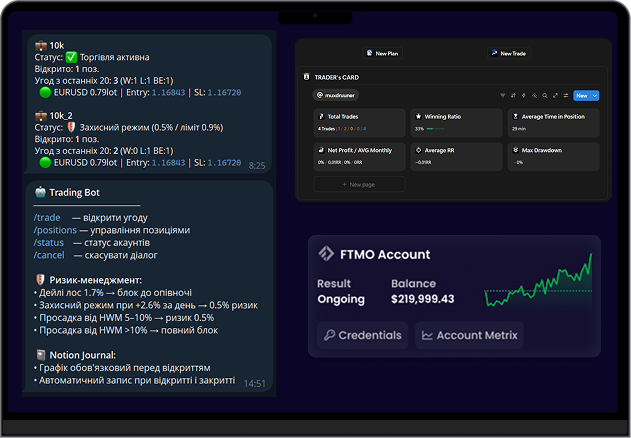
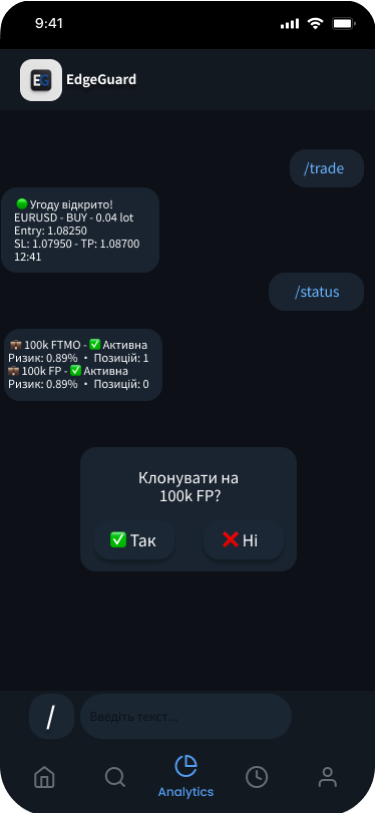
All you need for trading
from risk manager to detailed analytics

Risk manager
High Water Mark, daily loss and profit limits, soft/hard drawdown. Auto-block trading.

Multi-account
For prop and broker traders. Manage several MT5 accounts from one app.
Notion journal
Automatic journaling of your trades to your Notion with all the values.
App
Install the app on your phone. Simple interface with commands and buttons.
Statistics
Full transparency of your trading. See what actually works — and what drains your account.

Rules Control
Trade only when conditions are met. The app won't let you break your rules.
Ego kills your trading. EdgeGuard protects your edge.
Your edge, protected. Discipline is not optional — it's built in.
It's outside control — not just self-control from rules in your notes.
Rules are enforced automatically. No overtrading. No revenge. Just execution.
Trade only when conditions are met. Everything else is blocked.
Trust & Security
You control your funds.
We never access your fundsWe operate through your trading account — not your wallet.
Read-only + execution logicWe don't withdraw, transfer, or move money.
Secure connectionAll data is encrypted and protected.
If EdgeGuard stopsYour account keeps running normally.
Isolated accountsEach user runs in a separate environment.
No hidden actions
Every trade is logged and transparent.
In development
Join the whitelist
The app is still in development. Leave your email to get early access the moment we open the doors.
No spam. Just one email when access opens.
Questions:
How to connect an MT5 account?+
Enter your MT5 login, password and server in the app. The connection is read-only for data and execution-only for orders — setup takes about a minute.
Is my data safe?+
All credentials are encrypted at rest and in transit. Each account runs in an isolated environment and we never store or move your funds.
How does the Notion integration work?+
Connect your Notion workspace once and every closed trade is journaled automatically with entry, exit, R-multiple, notes and screenshots.
Can I use it on my phone?+
Yes. The mobile app gives you full control — monitor accounts, adjust rules and get alerts from anywhere.